AI Blog Writer With Images Free: 5 Tools and Their Limits
Most free AI writers give you the text and ration the images. Five tools that generate both, starting with Mark's 3 free articles with branded covers.
"Free" and "with images" rarely arrive together in AI writing tools. Most free tiers hand you the text and ration the pictures, so the post still needs a cover from a stock site, an image editor and a few more minutes before it can go live.
Anyone searching for an AI blog writer with images free to start wants that gap closed: the article and its images generated in the same pass, in a style that looks like your brand rather than a stock library. The catch is always in the free limit, which is why it pays to read exactly what each free option includes before you sign up.
Below are five tools that generate both the article and its images and let you start without paying, checked against their own sites in October 2026, starting with the one we build.
Table of contents
What should a free AI blog writer with images include?
A free AI blog writer with images is a tool that generates both the article and the pictures it needs, at no cost for a limited number of pieces or credits. Four questions separate the ones that save you work from the ones that just move it around.
- Does it make the featured image, or only images inside the text? The cover is what shows up in your blog feed and on every social share, so a tool that skips it leaves the most visible image to you.
- Can you control the style? Generic AI pictures look like everyone else's blog. Look for preset styles, your own colors and logo, or the option to use your own photo.
- What exactly is free? Some tools count articles, some count words and some count credits, and images often draw from a separate allowance.
- Do the images reach your site? An image you have to download and re-upload is half a feature. The best tools upload it to your CMS and set it as the featured image.
3 articles
What both Mark and SEOWriting.ai give you free before asking for a plan, with no payment details required. Vendor pricing pages, October 2026
Three articles is enough to judge a tool on your own topics, which is the only test that matters. Koala AI and ChatGPT measure their free tiers differently, in words, credits and image limits, so compare them by what one finished post costs rather than by the headline number.
The 5 best AI blog writers with images you can start free
All five generate images for the post as well as the text. They differ in how much the free start covers and in whether the images end up on your site without you touching them, so each entry below states both.
1. Mark
Mark is an AI content agent that researches the keyword, writes the article in your brand voice, generates the cover image and publishes everything to your CMS, WordPress, Webflow, HubSpot or Wix, from a single message on WhatsApp, Slack, Google Chat or the web chat. Every article also carries at least one HTML infographic, so the data reads as a visual without being a picture Google can't index.
Six cover styles, picked once
You choose how covers look in your settings, and that style applies to every article after it. The picker shows a live preview of the result before you save.
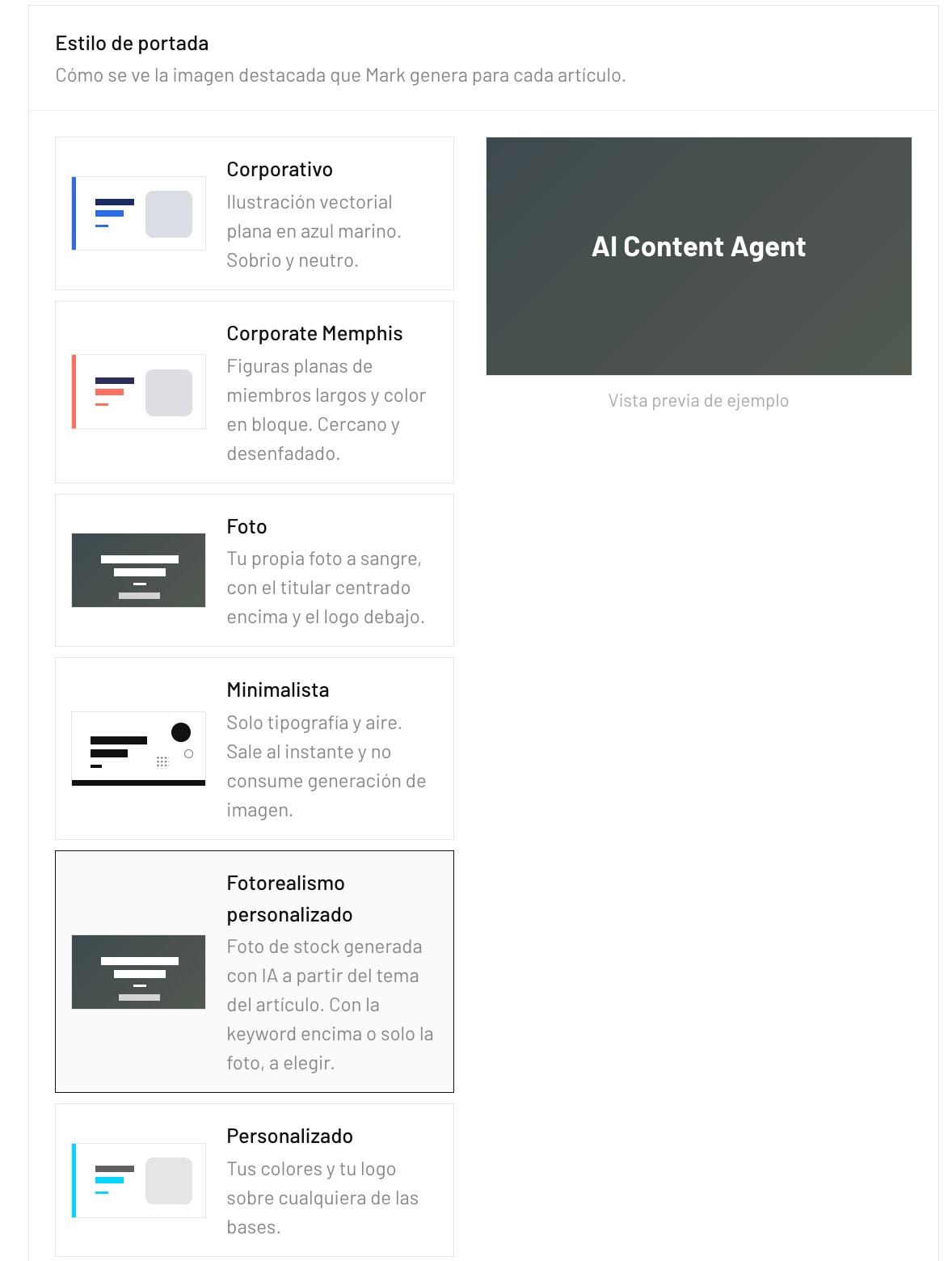
- Corporate: flat vector illustration in navy blue, sober and neutral.
- Corporate Memphis: flat long-limbed figures with block color, for a more approachable blog.
- Photo: your own photo full-bleed, with the headline centered on top and your logo below.
- Minimal: typography and white space only. It renders instantly and uses no image generation at all.
- Custom Photorealism: an AI-generated stock-style photo based on the article's topic, with the keyword on top or just the photo.
- Custom: your colors and your logo applied on top of any of the base styles.
What you can customize
Beyond the style, you can apply your brand colors and logo, and set the cover size in pixels, anywhere from 400 to 3,000 per side, for themes that crop differently. Left empty, covers ship at 1255 × 705, the size WordPress expects for a featured image. Need a specific photo inside the article? Attach it in the chat, say where it goes ("after paragraph 3") and Mark places it there on WordPress.
What the free trial includes
The trial runs for 14 days with no credit card and includes 3 complete articles, each researched, written, illustrated with its cover and published. It uses the Growth plan's options, so custom colors, logo and cover size are already unlocked. After that, plans start at $59 a month for 12 articles.
Mark's limit is focus: it covers organic content, the articles and the social posts that promote them, not paid ad campaigns, and the free start ends at three articles rather than a monthly allowance.
2. SEOWriting.ai
SEOWriting.ai has the closest free start to Mark's: 3 free articles with no payment details, and its AI Image Generator is listed on every plan, the free one included, according to its pricing page.
Paid plans start at $19 a month for up to 50 articles, or $14 billed yearly. It suits someone who wants volume at a low price and will handle cover branding and review on their own.
3. Koala AI
Koala AI gives every new account 5,000 free words and 25 credits with no card, enough for one or two long articles. Its images are embedded in articles automatically or generated on demand in KoalaImages, drawing from the credit allowance, as its pricing page describes.
It fits SEO writers who want long-form drafts with pictures at a low monthly price, with the caveat that a model with a higher word multiplier makes the free words run out sooner.
4. Manus
Manus works as a general AI agent with a dedicated AI blog writer that runs a live SERP analysis, drafts the post with metadata and FAQs, writes featured-image prompts and generates the images. You start on credits, and Manus itself is clear that its free access is not unlimited.
It suits people who want one agent for many tasks beyond blogging, at the cost of setting up the publishing step themselves.
5. ChatGPT
ChatGPT's free plan writes the article and includes limited image creation, per OpenAI's pricing page, with ChatGPT Go at $8 and Plus at $20 a month for more. It is the most flexible option and the most manual one: each image is a separate prompt, and nothing reaches your CMS unless you upload it.
How do the five free options compare?
Put side by side, the free starts measure different things: articles, words, credits or image limits. The table turns them into the two questions that decide the choice.
Five AI blog writers with images, by what the free start covers
| Tool | Free start | Images | Reaches your CMS |
|---|---|---|---|
| Mark | 3 articles, 14 days, no card | Cover in 6 styles, your colors and logo | Yes, published with the article |
| SEOWriting.ai | 3 articles, no card | AI image generator | Check your CMS integration |
| Koala AI | 5,000 words and 25 credits | Embedded automatically, uses credits | 1-click publishing |
| Manus | Starting credits | Featured-image prompts and images | You publish |
| ChatGPT | Free plan | Limited image creation | You upload |
Source: each vendor's pricing or product page, October 2026.
Read the last column first. A free image you still have to download, resize and upload costs you the same minutes as finding one on a stock site, so the free label only helps when the image arrives on your site with the post.
Which free AI blog writer with images should you choose?
If you want to see finished, published posts with branded covers before paying anything, Mark is the one to start with, because its 3 free articles include the whole pipeline. If the goal is many cheap drafts with pictures, SEOWriting.ai or Koala AI stretch a small budget further, and ChatGPT remains the flexible option for one-off posts you will assemble by hand.
Manus makes sense when the blog is one of many jobs you want a single agent to handle. For a broader comparison that also covers tools without images, see our list of the best AI blog post generators.
How to get the most out of 3 free articles
1255 × 705 px
Mark's default cover size, the one WordPress expects for a featured image. Custom sizes go from 400 to 3,000 px per side. Mark cover settings, October 2026
Set up the cover before the first article: pick a style, add your colors and logo, and check that the size matches your theme. Then use the three articles on three different kinds of post, a how-to, a comparison and a definition, so you see how covers and infographics look across formats.
Connect your CMS first, too, because the real test is a published URL with its featured image already in place. You can start the free trial in a few minutes, and the first of your three articles can be live the same day.
Frequently asked questions
Is there a free AI blog writer that also creates images?
Yes. Mark and SEOWriting.ai both start with 3 free articles that include AI images, Koala AI gives 5,000 free words with images embedded from its credits, and ChatGPT's free plan includes limited image creation. Mark is the only one of these that also publishes the cover to your CMS.
How many free articles does Mark's trial include?
Mark's free trial includes 3 complete articles over 14 days, with no credit card. Each one is researched, written, given a cover image in your chosen style and published to your CMS.
Can I customize the images Mark generates?
Yes. You pick one of six cover styles, add your brand colors and logo, use your own photo or an AI-generated one, and set the cover size between 400 and 3,000 pixels per side. These options are included in the free trial.
Does ChatGPT create blog images for free?
ChatGPT's free plan includes limited image creation, according to OpenAI's pricing page. Each image is generated by a separate prompt, and you still need to download it and upload it to your blog yourself.