Automate Featured Images for Blog Posts: How Mark Does It
Automating the cover image for every article with AI-generated visuals: what WordPress plugins already do, what they're missing, and how Mark solves it.
Every new article drags the same loose task behind it: the cover image. Someone has to open an editor, pick a template, type the headline, resize it for the CMS, and upload it, and none of that writes a single word of the article.
Once a blog publishes several pieces a week, that loose task starts to weigh as much as the writing itself. That's what it takes to automate featured images for blog posts: the cover shows up on its own, on brand, the moment the article publishes, without anyone opening a design tool.
Here's why that manual step turns into a bottleneck, what the tools already out there offer to automate it, and how Mark specifically handles it.
Table of contents
- 1Why does designing a cover image for every article become a bottleneck?
- 2How is this usually automated today, and what's missing?
- 3How does Mark automate featured images for blog posts?
- 4When is a template enough, and when do you want a real illustration?
- 5Why does this matter more than it seems?
- 6Frequently asked questions
Why does designing a cover image for every article become a bottleneck?
The manual process looks the same at most teams, every single time: open Canva or Photoshop, dig up a template that's already been used twenty times, type the headline over it, export at the right size, and upload it to the CMS before scheduling the post. None of those five steps adds a single idea to the article, and yet they happen one by one, for every piece, no exceptions.
One of the first problems you'll run into has less to do with the time you spend designing covers, and more with the fact that the time simply doesn't scale once the need to publish more starts showing up. A blog publishing several times a week needs that same cycle every time, and whoever does it usually isn't who wrote the article, so the cover also means waiting for someone else to find room in their week.
Back in 2023, Salesforce found that 62% of marketers already using generative AI were using it specifically to create image assets, precisely because that step is one of the first a team tries to hand off.
87%
of creators already using creative AI say it accelerated the growth of their business or audience. Source: Adobe, 2026 Creators' Toolkit Report (16,000+ respondents).
That boost covers everything a creator automates with AI, text and images alike, and the blog cover is one of the easiest visual tasks to add to that list.
How is this usually automated today, and what's missing?
The most common way to automate this in WordPress is auto-featured-image plugins: they check the post title or content and put together an image without anyone opening an editor. Some, like the "Auto Featured Image" family, just grab the first image already inside the article and set it as the cover. Others build a fixed-template card: same background, same spot for the text, only the headline changes.
That approach is already plenty fast. What it's actually missing is real visual variety: if the article doesn't carry an image of its own, or if a hundred articles in a row use the same background template, the whole blog ends up with covers that are interchangeable with each other. None of those tools generate a new illustration built for the article's actual topic, because none of them have a real image generator behind them.
That's where it's worth telling apart three genuinely different categories, even though all three get marketed as "automating the cover":
- Tools that reuse or crop an image already inside the article: fast, almost always free, but limited to whatever the article already has, and useless if it has nothing.
- Tools that build a text card on a fixed background: nothing reused, but nothing illustrated either.
- Tools that generate a brand-new image with AI based on the article's topic.
The first two categories dominate the WordPress plugin market today. The third is the one almost nobody offers built into the same publishing flow.
How does Mark automate featured images for blog posts?
Mark generates the cover in the same move it publishes the article, without anyone having to request it separately. It takes the article's keyword, builds an AI illustration in whatever visual style the client picked (there's a more corporate option, a more illustrative one, and a minimal, typography-only style for anyone who'd rather not depend on an illustration at all), and composes the headline, the client's logo, and the brand palette on top.
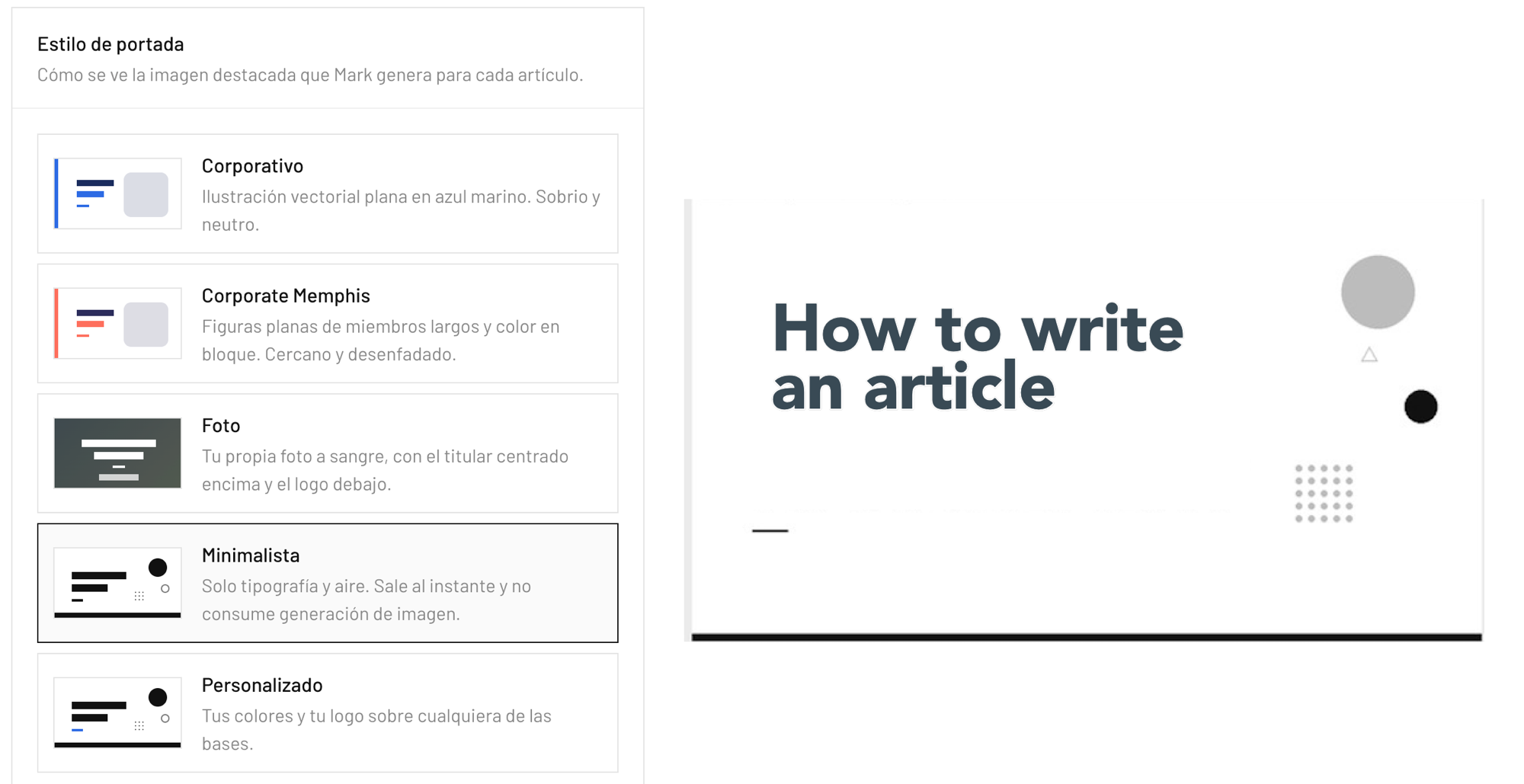
The result gets uploaded straight to the CMS media library and set as the post's featured image, ready for the blog feed and for the card that shows up when the link gets shared on social. Nobody has to export anything or re-upload a file by hand, the same workflow that researches and writes the article leaves the cover done too.
That same standard applies no matter how many times it repeats: the two-hundredth article's cover gets the same care as the first one, because the step doesn't depend on anyone remembering to do it by hand.
Why more teams keep automating their image design
- 77% of creators already call AI an "essential partner" in their creative work, not a side experiment Source: Canva, Design Trends 2026
- 5+ hours saved per week, on average, by marketing teams already using AI for content tasks Source: CoSchedule, State of AI in Marketing Report 2025 (1,005 respondents)
- 43% report significant cost savings from automating content tasks with AI Source: CoSchedule, State of AI in Marketing Report 2025
Those savings cover everything a marketing team automates with AI, images included. But the cover image is one of the easiest tasks to take off someone's plate, precisely because the generator wired into the publishing flow handles the part that other tasks would need editorial judgment for.
When is a template enough, and when do you want a real illustration?
A text-on-fixed-background template is enough when the blog is small, publishes rarely, or when the brand already has a visual system strong enough that the cover only needs to reinforce it without distracting from it. There's nothing to fix there: adding a fresh illustration to every cover in that case is extra work for nothing.
| Question | Fixed template | Generated illustration |
|---|---|---|
| Does it need the article to already have an image? | No | No |
| Does every cover look different from the last? | No | Yes |
| Does it hold up at 5 posts a month or 50? | Yes | Yes |
| Does someone need to review it before it publishes? | Rarely | Rarely |
37% vs. 21%
of bloggers publishing multiple times a week report strong results, versus the 21% overall benchmark. That's exactly where having one distinct cover per article outweighs a repeated template. Source: Orbit Media, 12th Annual Blogger Survey 2025 (808 respondents).
There's a third, less obvious signal: when whoever used to design the covers runs out of time for it and nobody else on the team wants to inherit the task. At that point it stops being a design decision and becomes an operational one, and it usually arrives sooner than the team expected.
Why does this matter more than it seems?
The cover is the first thing anyone sees of the article, before the headline even, when it shows up as a thumbnail in a feed or on a card shared on social media. Treating it as the last step of publishing, rushed together with whatever's on hand, means treating the article's first impression as the least important part of the process.
Automating it saves those five manual steps, but the real change is in the difference between a blog where every piece competes for its own attention with an image built for its own topic, and one where every cover looks interchangeable because they all came from the same template.
Mark handles it as one more step in the same workflow that writes the article: nobody has to remember to do it separately. Anyone who wants to see it work on their own blog can start with their first article and let the cover come out on its own, right along with the text.
Frequently asked questions
What if I don't like the cover style Mark generated?
You can pick a different one from the available styles (corporate, illustrative, minimal, or a custom one with your own colors and logo) in the client's settings, and that change applies to every cover Mark generates after that, not just the next one.
Does the cover upload itself to the CMS, or does someone have to upload it by hand?
It uploads straight to the CMS media library and gets set as the post's featured image in the same move that publishes the article. Nobody has to export the file or re-upload it.
Don't the WordPress plugins that already auto-generate covers solve this same problem?
They solve speed, but most of them reuse the first image already inside the article or build a text card on a fixed background. None of them generate a new illustration built for each article's actual topic, because none of them have a real image generator behind them.
When does a fixed template make more sense than a generated illustration?
When the blog is small, publishes rarely, or the brand already has a visual system strong enough that the cover only needs to reinforce it. A generated illustration earns its keep once volume goes up or the blog's topics are different enough from each other that a fixed template starts to feel repeated.
Ready for MARK to write your next articles?
Set it up in minutes. Researched, optimized for SEO and GEO, and published straight to your CMS.